Announcing DuckDB 1.5.0
TL;DR: We are releasing DuckDB version 1.5.0, codenamed “Variegata”. This release comes with a friendly CLI (a new, more ergonomic command line client), support for the VARIANT type, a built-in GEOMETRY type, along with many other features and optimizations. The v1.4.0 LTS line (“Andium”) will keep receiving updates until its end-of-life in September 2026.
We are proud to release DuckDB v1.5.0, codenamed “Variegata” after the Paradise shelduck (Tadorna variegata) endemic to New Zealand.
In this blog post, we cover the most important updates for this release around support, features and extensions. As always, there is more: for the complete release notes, see the release page on GitHub.
To install the new version, please visit the installation page. Note that it can take a few days to release some extensions (e.g., the UI) client libraries (e.g., Go, R, Java) due to the extra changes and review rounds required.
With this release, we will have two DuckDB releases available: v1.4 (LTS) and v1.5 (current). The next release – planned for September – will ship a major version, DuckDB v2.0.
New Features
Command Line Client
For users who use DuckDB through the terminal, the highlight of the new release is a rework of the CLI client with a new color scheme, dynamic prompts, a pager and many other convenience features.
Color Scheme
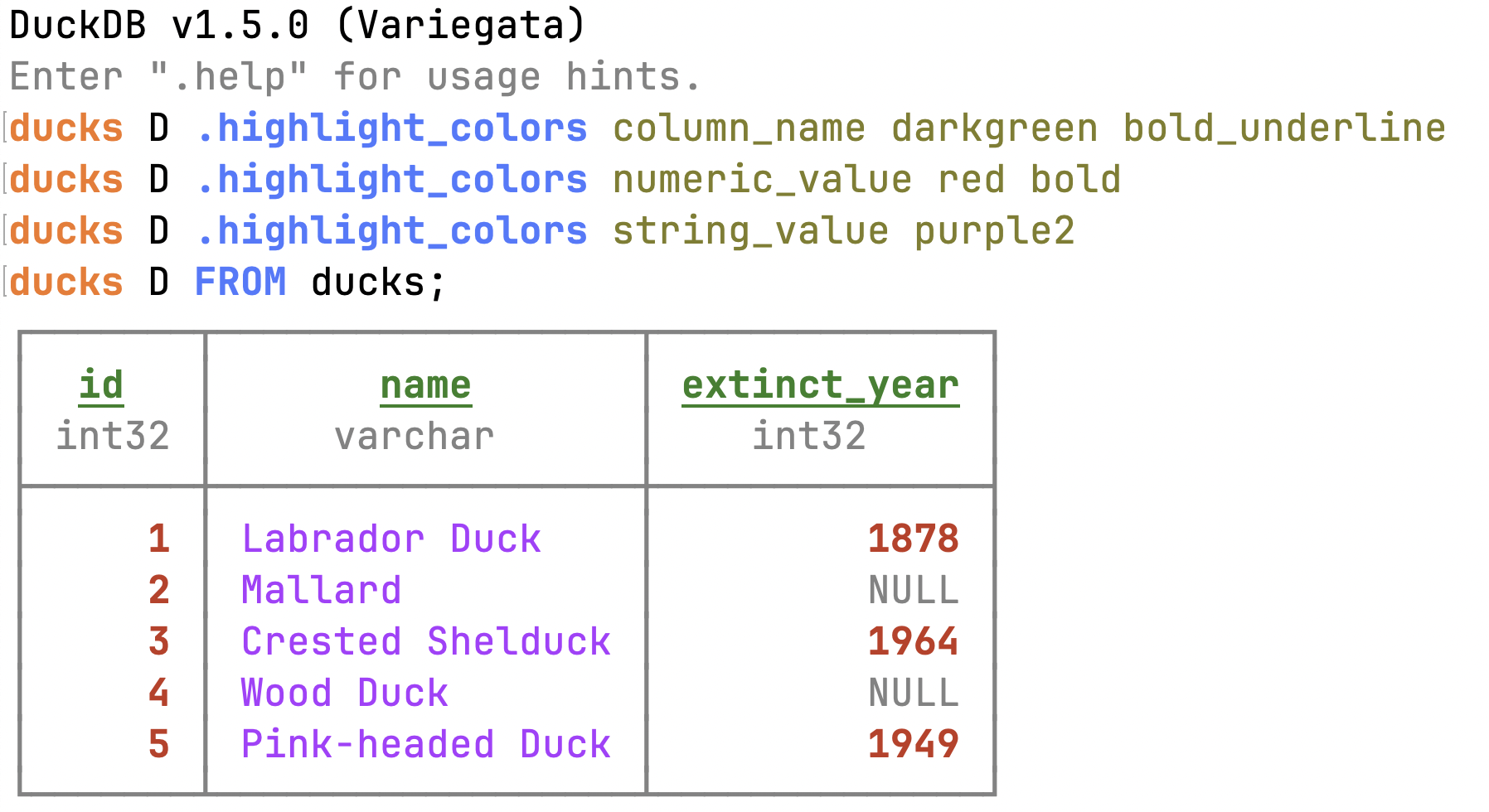
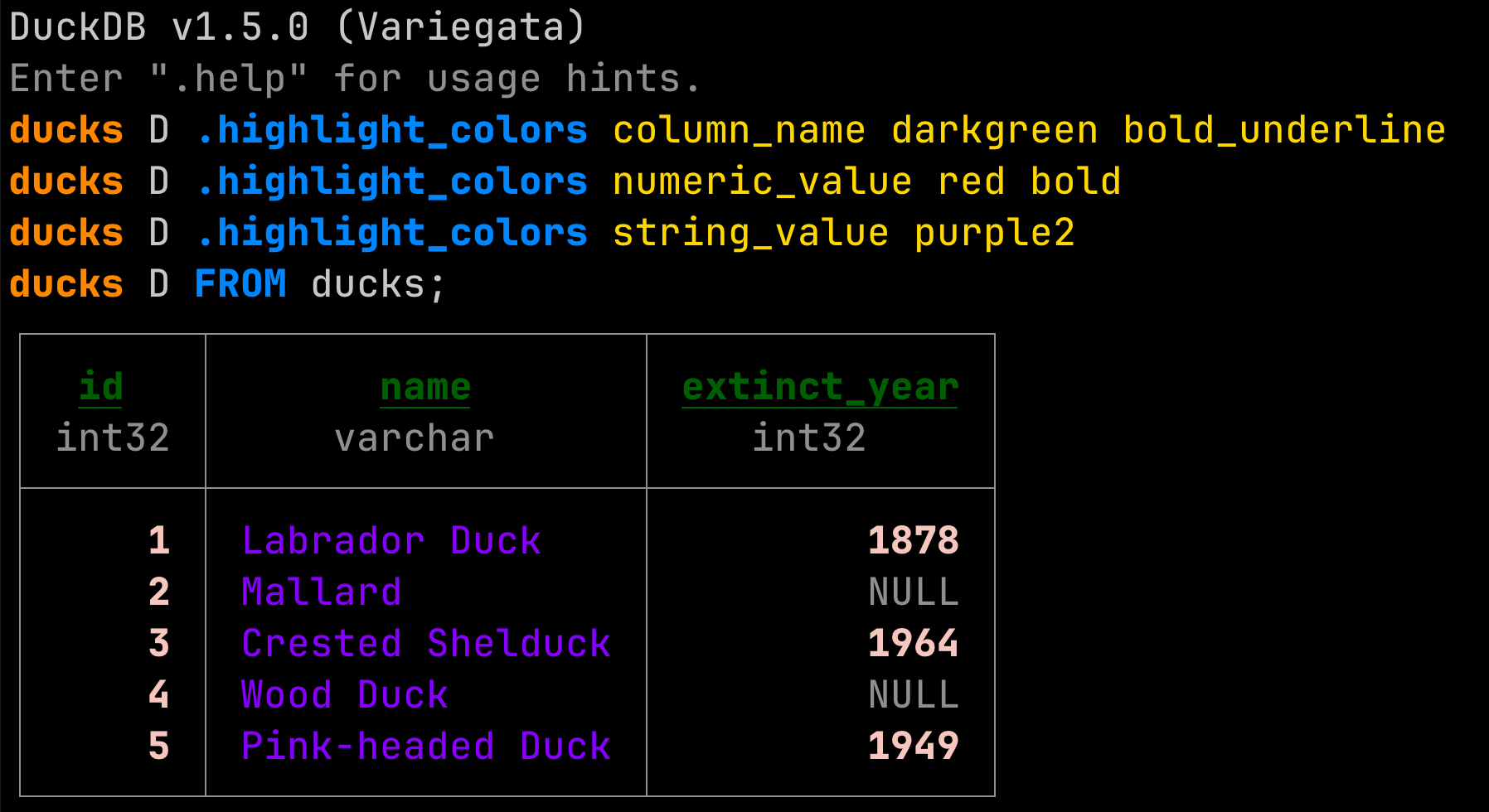
We shipped a new color palette and harmonized it with the documentation. The color palette is available in both dark mode and light mode. Both use two shades of gray, and five colors for keywords, strings, errors, functions and numbers. You can find the color palette in the Design Manual.
You can customize the color scheme using the .highlight_colors dot command:
.highlight_colors column_name darkgreen bold_underline
.highlight_colors numeric_value red bold
.highlight_colors string_value purple2
FROM ducks;
Dynamic Prompts in the CLI
DuckDB v1.5.0 introduces dynamic prompts for the CLI (PR #19579). By default, these show the database and schema that you are currently connected to:
duckdb
memory D ATTACH 'my_database.duckdb';
memory D USE my_database;
my_database D CREATE SCHEMA my_schema;
my_database D USE my_schema;
my_database.my_schema D ...
These prompts can be configured using bracket codes to have a maximum length, run a custom query, use different colors, etc. (#19579).
.tables and DESCRIBE
To show the columns of an individual table, use the DESCRIBE statement:
memory D ATTACH 'https://blobs.duckdb.org/data/animals.db' AS animals_db;
memory D USE animals_db;
animals_db D DESCRIBE ducks;
┌──────────────────────┐
│        ducks         │
│                      │
│ id           integer │
│ name         varchar │
│ extinct_year integer │
└──────────────────────┘
The .tables dot command lists the attached catalogs, the schemas and tables in them, and the columns in each table.
memory D ATTACH 'https://blobs.duckdb.org/data/animals.db' AS animals_db;
memory D ATTACH 'https://blobs.duckdb.org/data/numbers1.db';
memory D .tables
 ────────────── animals_db ───────────────
 ───────────────── main ──────────────────
┌─────────────────┐┌──────────────────────┐
│      swans      ││        ducks         │
│                 ││                      │
│ id      integer ││ id           integer │
│ name    varchar ││ name         varchar │
│ species varchar ││ extinct_year integer │
│ color   varchar ││                      │
│ habitat varchar ││        5 rows        │
│                 │└──────────────────────┘
│     3 rows      │
└─────────────────┘
  numbers1
 ── main ──
┌──────────┐
│   tbl    │
│          │
│ i bigint │
│          │
│  2 rows  │
└──────────┘
Accessing the Last Result Using _
You can access the last result of a query inline using the underscore character _. This is not only convenient but also makes it unnecessary to re-run potentially long-running queries:
memory D ATTACH 'https://blobs.duckdb.org/data/animals.db' AS animals_db;
memory D USE animals_db;
animals_db D FROM ducks WHERE extinct_year IS NOT NULL;
┌───────┬──────────────────┬──────────────┐
│  id   │       name       │ extinct_year │
│ int32 │     varchar      │    int32     │
├───────┼──────────────────┼──────────────┤
│     1 │ Labrador Duck    │         1878 │
│     3 │ Crested Shelduck │         1964 │
│     5 │ Pink-headed Duck │         1949 │
└───────┴──────────────────┴──────────────┘
animals_db D FROM _;
┌───────┬──────────────────┬──────────────┐
│  id   │       name       │ extinct_year │
│ int32 │     varchar      │    int32     │
├───────┼──────────────────┼──────────────┤
│     1 │ Labrador Duck    │         1878 │
│     3 │ Crested Shelduck │         1964 │
│     5 │ Pink-headed Duck │         1949 │
└───────┴──────────────────┴──────────────┘
Pager
Last but not least, the CLI now has a pager! It is triggered when there are more than 50 rows in the results.
memory D .maxrows 100
memory D FROM range(0, 100);
You can navigate on Linux and Windows using Page Up / Page Down. On macOS, use Fn + Up / Down. To exit the pager, press Q.
The initial implementation of the pager was provided by tobwen in #19004.
PEG Parser
DuckDB v1.5 ships an experimental parser based on PEG (Parser Expression Grammars). The new parser enables better suggestions, improved error messages, and allows extensions to extend the grammar. The PEG parser is currently disabled by default but you can opt-in using:
CALL enable_peg_parser();
The PEG parser is already used for generating suggestions. You can cycle through the options using TAB.
animals_db D FROM ducks WHERE habitat IS
IS           ISNULL       ILIKE        IN           INTERSECT    LIKE
We are planning to make the switch to the new parser in the upcoming DuckDB release.
As a tradeoff, the parser has a slight performance overhead, however, this is in the range of milliseconds and is thus negligible for analytical queries. For more details on the rationale for using a PEG parser and benchmark results, please refer to the CIDR 2026 paper by Hannes and Mark, or their blog post summarizing the paper.
VARIANT Type
DuckDB now natively supports the VARIANT type, inspired by Snowflake's semi-structured VARIANT data type and available in Parquet since 2025. Unlike the JSON type, which is physically stored as text, VARIANT stores typed, binary data. Each row in a VARIANT column is self-contained with its own type information. This leads to better compression and query performance. Here are a few examples of using VARIANT.
Store different types in the same column:
CREATE TABLE events (id INTEGER, data VARIANT);
INSERT INTO events VALUES
    (1, 42::VARIANT),
    (2, 'hello world'::VARIANT),
    (3, [1, 2, 3]::VARIANT),
    (4, {'name': 'Alice', 'age': 30}::VARIANT);

SELECT * FROM events;
┌───────┬────────────────────────────┐
│  id   │            data            │
│ int32 │          variant           │
├───────┼────────────────────────────┤
│     1 │ 42                         │
│     2 │ hello world                │
│     3 │ [1, 2, 3]                  │
│     4 │ {'name': Alice, 'age': 30} │
└───────┴────────────────────────────┘
Check the underlying type of each row:
SELECT id, data, variant_typeof(data) AS vtype
FROM events;
┌───────┬────────────────────────────┬───────────────────┐
│  id   │            data            │       vtype       │
│ int32 │          variant           │      varchar      │
├───────┼────────────────────────────┼───────────────────┤
│     1 │ 42                         │ INT32             │
│     2 │ hello world                │ VARCHAR           │
│     3 │ [1, 2, 3]                  │ ARRAY(3)          │
│     4 │ {'name': Alice, 'age': 30} │ OBJECT(name, age) │
└───────┴────────────────────────────┴───────────────────┘
You can extract fields from nested variants using the dot notation or the variant_extract function:
SELECT data.name FROM events WHERE id = 4;
-- or
SELECT variant_extract(data, 'name') AS name FROM events WHERE id = 4;
┌─────────┐
│  name   │
│ variant │
├─────────┤
│ Alice   │
└─────────┘
DuckDB also supports reading VARIANT types from Parquet files, including shredding (storing nested data as flat values).
read_duckdb Function
The read_duckdb table function can read DuckDB databases without first attaching them. This can make reading from DuckDB databases more ergonomic – for example, you can use globbing. You can read the example numbers databases as follows:
SELECT min(i), max(i)
FROM read_duckdb('numbers*.db');
┌────────┬────────┐
│ min(i) │ max(i) │
│ int64  │ int64  │
├────────┼────────┤
│      1 │      5 │
└────────┴────────┘
Azure Writes
You can now write to the Azure Blob or ADLSv2 storage using the COPY statement:
-- Write query results to a Parquet file on Blob Storage
COPY (SELECT * FROM my_table)
TO 'az://my_container/path/output.parquet';

-- Write a table to a CSV file on ADLSv2 Storage
COPY my_table
TO 'abfss://my_container/path/output.csv';
ODBC Scanner
We are now shipping an ODBC scanner extension. This allows you to query a remote endpoint as follows:
LOAD odbc_scanner;
SET VARIABLE conn = odbc_connect('Driver={Oracle Driver};DBQ=//127.0.0.1:1521/XE;UID=scott;PWD=tiger;');
SELECT * FROM odbc_query(getvariable('conn'), 'SELECT SYSTIMESTAMP FROM dual;');
In the coming weeks, we'll publish the documentation page and release a followup post on the ODBC scanner. In the meantime, please refer to the project's README.
Major Changes
Breaking Change for Datetime Function
The date_trunc function, when applied to a DATE, now returns a TIMESTAMP instead of a date.
-- v1.4.4:
SELECT typeof(date_trunc('month', DATE('2026-03-27')));
-- returns DATE

-- v1.5.x:
SELECT typeof(date_trunc('month', DATE('2026-03-27')));
-- returns TIMESTAMP
Lakehouse Updates
All of DuckDB’s supported Lakehouse formats have received some updates in DuckDB v1.5.
DuckLake
The main DuckLake change for DuckDB v1.5 is updating the DuckLake specification to v0.4. We are aiming for this to be the same specification that ships with DuckLake v1.0, which will be released in April. Its main highlights include:
- Macro support.
- Sorted tables.
- Deletion inlining and addition of partial delete files.
- Internal rework of DuckLake options.
We'll announce more details about these features in the blog post for DuckLake v1.0.
Delta Lake
For the Delta Lake extension, the team has focused on improving support for writes via Unity Catalog, Delta idempotent writes and table CHECKPOINTs.
Iceberg
For the Iceberg extension, the team is working on a larger release for v1.5.1. For v1.5.0, the main feature is the addition of table properties in the CREATE TABLE statement:
CREATE TABLE test_create_table (a INTEGER)
WITH (
    'format-version' = '2', -- format version will be elevated to format-version when creating a table
    'location' = 's3://path/to/data', -- location will be elevated to location when creating a table
    'property1' = 'value1',
    'property2' = 'value2'
);
Other minor additions have been made to enable passing EXTRA_HTTP_HEADERS when attaching to an Iceberg catalog, which has unlocked Google’s BigLake.
Both Delta and DuckLake have implemented the
VARIANTtype. Iceberg’sVARIANTtype will ship in the v1.5.1 release with some other features that are specific to the Iceberg v3 specification.
Network Stack
The default backend for the httpfs extension has changed from httplib to curl. As one of the most popular and well-tested open-source projects, we expect curl to provide long-standing stability and security for DuckDB. Regardless of the http library used, openssl is still the backing SSL library and options such as http_timeout, http_retries, etc. are still the same.
Our community has been testing the new network stack for the last few weeks. Still, if you encounter any issues, please submit them to the duckdb-httpfs repository.
If you are interested in more details, click here.
Due to technical reasons, httplib is still the library we use for downloading the httpfs extension. When httpfs is loaded with the (now default) curl backend, subsequent extension installations go through https://, with the default endpoint for core extensions pointing to https://extensions.duckdb.org.
All core and community extensions are cryptographically signed, so installing them through http:// does not pose a security risk. However, some users reported issues about http:// extension installs in environments with firewalls.
Lambda Syntax
Up to DuckDB v1.2, the syntax for defining lambda expressions used the arrow notation x -> x + 1. While this was a nice syntax, it clashed with the JSON extract operator (->) due to operator precedence and led to error messages that some users found difficult to troubleshoot. To work around this, we introduced a new, Python-style lambda syntax in v1.3, lambda x: x + 1.
While DuckDB v1.5 supports both styles of writing lambda expressions, using the deprecated arrow syntax will now throw a warning:
SELECT list_transform([1, 2, 3], x -> x + 1);
WARNING:
Deprecated lambda arrow (->) detected. Please transition to the new lambda syntax, i.e., lambda x, i: x + i, before DuckDB's next release.
You can use the lambda_syntax configuration option to change this behavior to suppress the warning or to behave more strictly:
-- Suppress the warning
SET lambda_syntax = 'ENABLE_SINGLE_ARROW';
-- Turn the deprecation warning into an error
SET lambda_syntax = 'DISABLE_SINGLE_ARROW';
DuckDB 2.0 will disable the single arrow syntax by default and it will only be available if you opt-in explicitly.
Spatial Extension
The spatial extension ships several important changes.
Breaking Change: Flipping of Axis Order
Most functions in spatial operate in Cartesian space and are unaffected by axis order, e.g., whether the X and Y axes represent “longitude” and “latitude” or the other way around. But there are some functions where this matters, and where the assumption, counterintuitively, is that all input geometries use (x = latitude, y = longitude). These are:
ST_Distance_SpheroidST_Perimeter_SpheroidST_Area_SpheroidST_Distance_SphereST_DWithin_Spheroid
Additionally, ST_Transform also expects that the input geometries are in the same axis order as defined by the source coordinate reference system, which in the case of e.g., EPSG:4326 is also (x = latitude, y = longitude).
This has been a long-standing source of confusion and numerous issues, as other databases, formats and GIS systems tend to always treat X as “easting”, “left-right” or “longitude”, and Y as “northing”, “up-down” or “latitude”.
We are changing how this currently works in DuckDB to be consistent with how other systems operate, and hopefully cause less confusion for new users in the future. However, to avoid silently breaking existing workflows that have adapted to this quirk (e.g., by using ST_FlipCoordinates), we are rolling out this change gradually via a new geometry_always_xy setting:
- In DuckDB v1.5, setting
geometry_always_xy = trueenables the new behavior (x = longitude, y = latitude). Without it, affected functions emit a warning. - In DuckDB v2.0, the warning will become an error. Set
geometry_always_xy = falseto preserve the old behavior. - In DuckDB v2.1,
geometry_always_xy = truewill become the default.
So to summarize, nothing is changing by default in this release, but to avoid being affected by this change in the future, set geometry_always_xy explicitly now. Set it to true to opt into the new behavior, or false to keep the existing one.
Geometry Rework
GEOMETRY Becomes a Built-In Type
The GEOMETRY type has been moved from the spatial extension into core DuckDB!
Geospatial data is no longer niche. The Parquet standard now treats GEOMETRY as a first-class column type, and open table formats like Apache Iceberg and DuckLake are moving in the same direction. Many widely used data formats and systems also have geospatial counterparts—GeoJSON, PostGIS, GeoPandas, GeoPackage/Spatialite, and more.
DuckDB already offers extensions that integrate with many of these formats and systems. But there’s a structural problem: as long as GEOMETRY lives inside the spatial extension, other extensions that want to read or write geospatial data must either depend on spatial, implement their own incompatible geometry representation, or force users to handle the conversions themselves.
By moving GEOMETRY into DuckDB’s core, extensions can now produce and consume geometry values natively, without depending on spatial. While the spatial extension still provides most of the functions for working with geometries, the type itself becomes a shared foundation that the entire ecosystem can build on. We’ve already added GEOMETRY support to the Postgres scanner and GeoArrow conversion for Arrow import and export. Geometry support in additional extensions is coming soon.
This change also enables deeper integration with DuckDB’s storage engine and query optimizer, unlocking new compression techniques, query optimizations, and CRS awareness capabilities that were not possible when GEOMETRY only existed as an extension type. This is all documented in the new geometry page in the documentation, but we will highlight some below.
Improved Storage: WKB and Shredding
Geometry values are now stored using the industry-standard little-endian Well-Known Binary (WKB) encoding, replacing the custom format used by the spatial extension. However, we are still experimenting with the in-memory representation we want to use in the execution engine so you should still use the conversion functions (e.g., ST_AsWKT, ST_AsWKB, ST_GeomFromText, ST_GeomFromWKB) when moving data in and out of DuckDB.
We’ve also implemented a new storage technique specialized for GEOMETRY. When a geometry column contains values that all share the same type and vertex dimensions, DuckDB can additionally apply “shredding”: rather than storing opaque blobs, the column is decomposed into primitive STRUCT, LIST, and DOUBLE segments that compress far more efficiently. This can reduce on-disk size by roughly 3x for uniform geometry columns such as point clouds. Shredding is applied automatically for uniform row groups of a certain size, but can be configured via the geometry_minimum_shredding_size configuration option.
Geometry Statistics and Query Optimization
Geometry columns now track per-row-group statistics - including the bounding box and the set of geometry types and vertex dimensions present. The query optimizer can use these to skip row groups that cannot match a query's spatial predicates, similar to min/max pruning for numeric columns. The && (bounding box intersection) operator is the first to benefit; broader support across spatial functions is in progress.
Coordinate Reference System Support
The GEOMETRY type now accepts an optional CRS parameter (e.g., GEOMETRY('OGC:CRS84')), making CRS part of the type system rather than implicit metadata. Spatial functions enforce CRS consistency across their inputs, catching a common class of silent errors that arises when mixing geometries from different coordinate systems. Only a couple of CRSs are built in by default, but loading the spatial extension registers over 7,000 CRSs from the EPSG dataset. While CRS support is still a bit experimental, we are planning to develop it further to support e.g., custom CRS definitions.
Optimizations
Non-Blocking Checkpointing
During checkpointing, it's now possible to run concurrent reads (#19867), writes (#20052), insertions with indexes (#20160) and deletes (#20286). The rework of checkpointing benefits concurrent RW workloads and increases the TPC-H throughput score on SF100 from 246,115.60 to 287,122.97, a 17% improvement.
Aggregates
Aggregate functions received several optimizations. For example, the last aggregate function was optimized by community member xe-nvdk to iterate from the end of each vector batch instead of the beginning. In synthetic benchmarks, this results in a 40% speedup.
Distribution
Python Pip
You can install the DuckDB CLI on any platform where pip is available:
pip install duckdb-cli
You can then launch DuckDB in your virtual environment using:
duckdb
Both DuckDB v1.4 and v1.5 are supported. We are working on shipping extensions as extras using the duckdb[extension_name] syntax – stay tuned!
Windows Install Script (Beta)
On Windows, you can now use an install script:
powershell -NoExit iex (iwr "https://install.duckdb.org/install.ps1").Content
Please note that this is currently in the beta stage. If you have any feedback, please let us know.
CLI for Linux with musl libc
We are distributing CLI clients that work with musl libc (e.g., for Alpine Linux, commonly used in Docker images). The archives are available on GitHub.
Note that the musl libc CLI client requires the libstdc++. To install this package, run:
apk add libstdc++
Extension Sizes
We reworked our build system to make the extension binaries smaller! The DuckLake extension's size was reduced by ~30%, from 17 MB to 12 MB. For smaller extensions such as Excel, the reduction is more than 60%, from 9 MB to 3 MB.
Summary
These were a few highlights – but there are many more features and improvements in this release. There have been over 6500 commits by close to 100 contributors since v1.4. The full release notes can be found on GitHub. We would like to thank our community for providing detailed issue reports and feedback. And again, our special thanks go to external contributors!
PS: If you visited this blog post through a direct link – we also rolled out a new landing page!
Appendix: Example Dataset
See the code that creates the example databases.
ATTACH 'numbers1.db';
ATTACH 'numbers2.db';
ATTACH 'animals.db';

CREATE TABLE numbers1.tbl AS FROM range(1, 3) t(i);

CREATE TABLE numbers2.tbl AS FROM range(2, 6) t(i);

CREATE TABLE animals.ducks AS
FROM (VALUES
    (1, 'Labrador Duck', 1878),
    (2, 'Mallard', NULL),
    (3, 'Crested Shelduck', 1964),
    (4, 'Wood Duck', NULL),
    (5, 'Pink-headed Duck', 1949)
) t(id, name, extinct_year);

CREATE TABLE animals.swans AS
FROM (VALUES
    (1, 'Aurora', 'Mute Swan', 'White', 'European lakes and rivers'),
    (2, 'Midnight', 'Black Swan', 'Black', 'Australian wetlands'),
    (3, 'Tundra', 'Tundra Swan', 'White', 'Arctic and subarctic regions')
) t(id, name, species, color, habitat);

DETACH numbers1;
DETACH numbers2;
DETACH animals;